
Internet · Canada
Faster Wi-Fi in a Canadian Apartment Without Paying for a Higher Internet Tier

Renters often buy a higher internet tier because Zoom looks soft in the bedroom — when the pipe to the building is fine and the Wi-Fi path is the bottleneck. Canadian apartments add concrete floors, neighbour radios, bulk-building gateways, and landlord coax rules. This guide is a weekend fix path that avoids an unnecessary ISP upgrade. Education only; stamped ~22 Sep 2026.
Key takeaways
- Run a wired speed test before you buy more megabits.
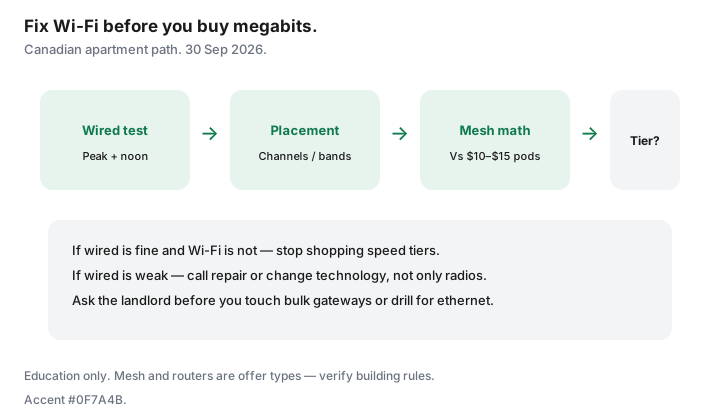
- Fix placement and channels before mesh; fix mesh before a plan upgrade.
- Compare buy-once mesh to $10–$15 ISP pod rentals over 24–36 months.
- Bulk deals and landlord coax rules can block gear changes — ask first.
- If wired rates are already low, a speed upgrade may help; if only Wi-Fi is low, it will not.
Speed test wired vs Wi-Fi to find the real bottleneck
- Plug a laptop into the gateway with ethernet (USB-C adapters count).
- Test at peak evening and once at noon — save screenshots.
- Repeat on Wi-Fi in the worst room.
- If wired meets the plan and Wi-Fi does not, stop shopping tiers.
CRTC’s national 50/10 floor is a policy benchmark, not your apartment’s Wi-Fi guarantee. Cost per usable megabit after the promo matters more than the download number on the box.
Router placement and channel basics for condos
- Move the gateway out of the media cabinet and off the floor.
- Prefer a central shelf over a window on the neighbour’s access point.
- Use the ISP app or a basic analyzer to avoid the busiest 2.4 GHz channels; try 5 GHz/6 GHz in the same room as work.
- Rename bands so gadgets that can use 5 GHz stop clinging to 2.4 GHz.
Mesh vs ISP extender rentals for apartments
ISP pods at about $10–$15 each add up. A small buy-once mesh (ethernet backhaul if you can hide a cable along baseboards) often wins on 24-month math — see our mesh vs pods guide. In a studio, one well-placed router beats three poorly placed nodes.
Landlord/building constraints (bulk deals, coax)
Some buildings include bulk internet in fees. You may still have rights to seek another provider under CRTC MDU access rules — see apartment and condo rights — but you might not be allowed to swap the bulk modem or drill for ethernet. Ask the property manager before you buy a mesh that needs LAN ports you do not control. Coax splitters behind a panel can also starve the gateway; that is a building issue, not a “need 1 Gbps” issue.
When a speed upgrade still will not help
- Wired test already far below plan — call repair, do not buy mesh alone.
- Single old laptop on 2.4 GHz while the phone flies on 5 GHz — client hardware.
- VPN and cloud backup saturating upload — consider technology (fibre upload), not another 500 Mbps of download.
- Bulk gateway with no bridge mode — you may need landlord permission or a different provider at the unit.
A weekend Wi-Fi fix checklist
| Block | Tasks |
|---|---|
| Saturday morning | Wired vs Wi-Fi tests; screenshot results |
| Saturday afternoon | Reposition gateway; tidy coax; reboot |
| Saturday evening | Retest at peak; adjust channels/bands |
| Sunday | If still weak: price mesh vs pod rental; confirm landlord rules |
| Only then | Call ISP for repair or a tier change if wired is the limit |
Sources
- CRTC broadband objective context (50/10) and MDU access decisions referenced on our apartment-rights guide (~22 Sep 2026).
- Saving Optimizer: mesh vs ISP pods; how much speed you need; buy vs rent modem; apartment internet rights.
Frequently asked questions
Will upgrading from 100 to 500 Mbps fix my bedroom Wi-Fi?
Not if ethernet at the gateway already shows ~100 Mbps and Wi-Fi in the bedroom shows 20. Fix radios and placement first.
Are ISP rental pods bad?
They are convenient and expensive over time. Add up 24 months of $10–$15 each, then compare a buy-once mesh you can take to the next apartment.
Can my landlord ban a mesh system?
They can restrict drilling and tampering with bulk equipment. Plug-in nodes that do not alter building wiring are usually a conversation, not a loophole — ask.
Should I enable both ISP Wi-Fi and my mesh SSID?
Prefer one DHCP brain: bridge or disable the ISP radio when the UI allows, so devices do not roam between overlapping networks.
When is a fibre upgrade the real answer?
When wired upload or download at the gateway is the limit for WFH — not when only the back bedroom is weak on Wi-Fi.
Researched and drafted with AI assistance and fact-checked against official Canadian sources. How we create content.
Note: Verify building rules before you drill or replace a bulk modem.